


Scope: This guide covers Litter-Robot 3 and LR3 Connect.
If your Litter-Robot 3 flashes blue while the waste drawer looks empty, start with the drawer liner and the Drawer Full Indicator (DFI) sensors above the drawer. A bag edge, dust, or cat hair can interfere with the infrared sensors and trigger a false full indication. Empty and reseat the liner first. If the light returns, clean the DFI sensor brackets only by following Whisker’s power-off and disassembly instructions below. Whisker’s LR3 guide
Quick checks
| What you see | What it means on LR3 | First action |
|---|---|---|
| Blue light flashing | Drawer-full indication; the DFI checks the drawer when the globe returns home | Empty drawer, tuck the liner into all four tabs and keep it below the drawer sides, reinstall drawer, then press Reset and Cycle |
| Blue flashing returns with an empty drawer | Bag interference or debris on/near the DFI sensors may be affecting the reading | Check liner edges; if it persists, power off and clean the DFI brackets as described below |
| Solid blue light | Ready for use | No action needed |
| Other light pattern | May indicate another condition, such as a cat-sensor interruption or globe-position fault | Use the LR3 lights guide and match the exact pattern; do not assume it is a DFI problem |
A flashing blue light is the LR3 drawer-full signal. After the first DFI activation, Whisker says the robot completes two more cycles before automatic cycling stops. LR3 buttons and lights
1. Empty the drawer and reseat the liner
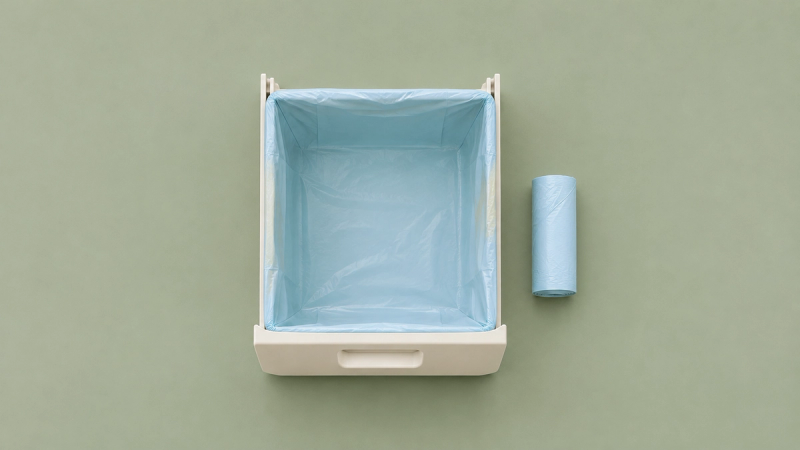
Remove waste and reinstall the liner. Tuck it into all four retaining tabs and keep it from coming up past the top of the drawer sides; an edge sticking up can interfere with the DFI. Slide the drawer fully back into place.
With the globe at Home, press and release Reset to zero the cat/weight sensor after changing the drawer or other unit weight. Then press Cycle for a new reading. On LR3 Connect, tap Reset Gauge in the app after emptying the drawer to reset the app’s drawer-level estimate. That app action is separate from the physical DFI and blue indicator. Whisker LR3 drawer-full steps · Whisker Reset button guide
2. Clean the DFI sensors if the false warning continues
Dust or cat hair can block the LR3’s two infrared DFI sensors above the waste drawer. Whisker’s cleaning procedure requires taking the unit apart to reach the sensor brackets:
- Press Power to turn the robot off, then unplug it from the wall. Whisker describes unplugging as a hard reset.
- Remove the bonnet, globe, and waste drawer using the LR3 assembly instructions. Keep the parts on a stable surface.
- Find the two DFI sensors inside the base, above the drawer opening, and check for obstructions.
- Wipe the DFI brackets with a dry or slightly damp microfiber cloth. Avoid ammonia-based window, glass, mirror, or multi-surface cleaners. Then check for signs of corrosion.
- Reinstall the waste drawer, globe, and bonnet. Seat the globe in its tracks and the rear key in its pocket; snap the bonnet into place.
- Plug the unit back in and power it on. Let the initial cycle finish. Check for a solid blue ready light.
Follow Whisker’s LR3 DFI guide and assembly guide diagrams. Do not cover or bypass sensors.
What Reset does, and what it does not do
On LR3, Reset zeros the cat sensor after weight or placement changes; it does not clean the DFI. If debris causes the warning, clean the sensors. Whisker’s empty-drawer procedure uses Reset followed by Cycle. These steps are specific to LR3. LR3 Reset button · LR3 manual
LR3 Connect adds notifications and an adaptive app gauge. Whisker says it learns from full-to-empty use over several cycles. The physical DFI still uses the blue flashing indicator and LR3 cleaning guidance. Whisker app troubleshooting
Litter-Robot 4 uses its OmniSense laser and weight-sensor system, with three bezel curtain sensors and a separate DFI calibration procedure. LR3 uses infrared DFI sensors above the drawer; do not apply LR4 calibration steps to LR3. Have Litter-Robot 4 instead? See our LR4 drawer-full guide. LR4 sensors · LR4 DFI troubleshooting · LR4 calibration guide
When to contact Whisker
Contact Whisker if blue flashing persists after the liner check and DFI cleaning, you find corrosion, or the unit cannot finish and return to solid blue. Whisker says unresolved DFI issues may require a pinch-contact and DFI kit or a base. Provide the model, light pattern, and checks completed. Do not attempt further electrical repair unless directed by Whisker.
FAQs
Why does my LR3 say the drawer is full when it is empty?
A liner that sticks above the drawer rim or debris such as dust and cat hair on the DFI sensor path can cause a false reading. Reseat the bag, then clean the DFI brackets if needed.
Does pressing Reset clear the LR3 drawer-full sensor?
Reset zeros the cat sensor after weight changes. Whisker’s empty-drawer procedure says to press Reset and then Cycle to take a new drawer reading. If the false warning is caused by debris, clean the DFI sensors too.
Does this apply to Litter-Robot 4?
No. This article covers LR3 and LR3 Connect. LR4 uses different sensing and calibration guidance.